How to Get Approved for Instagram Shopping: A Comprehensive Guide 2025
Get approved for Instagram Shopping in 2025. Meet eligibility, verify your domain, build trust, and boost sales. Follow our step-by-step guide to start selling.

Table of Contents
In the modern competitive digital landscape, Instagram Shopping is a key tool for brands seeking to expand their reach and optimize sales through the platform. Instagram Shopping allows brands to showcase their products and services directly on their Instagram stories and Instagram feed.
However, getting approved is a process that demands more than active Instagram account, which has been a hurdle for many brands. This guide explores the step-by-step process on how to get approved for Instagram Shopping and the best practices for optimal outcomes.
Instagram Shopping Eligibility Requirements
Before commencing the Instagram Shopping application process, you must first understand Instagram Shopping eligibility requirements. These requirements include:
a). Comply with Instagram policies
Your Instagram must comply with Instagram's Terms of Use and Community Standards otherwise your account may be disabled.
b). Represent Your Business and Your Domain
Your Instagram Shopping account contains product listings that can be directly purchased from your website. This means that you must provide your brand's domain. To confirm your domain, Instagram might require you to complete the domain verification process.
c). Be Located in a Supported Country
Your brand's Instagram Shopping account must be located in one of the countries supported by Instagram commerce features. Currently, checkout on Instagram is only supported in the United States.
d). Demonstrate Trustworthiness
Your Instagram account should have demonstrated trustworthiness, including an authentic, established presence on Instagram. This might also include maintaining a good follower base.
e). Provide Accurate Information and Follow Best Practices
Failure to comply with the requirements above at any time might lead to the loss of Instagram Shopping features or your account being disabled.
These policies are meant to create a trustworthy and safe environment for Instagram users. Now, let's discuss the step-by-step process of how to get approved for Instagram Shopping.
How to Get Approved for Instagram Shopping
Setting Up Your Instagram Business Account
The first step towards getting approved for Instagram Shopping is opening an Instagram Business Account. If you currently have a private or personal account, you must switch to a business profile on your account settings.
The procedure on how to set up a business account on Instagram includes:
Login to your Instagram Account: You can access the Instagram account via mobile or computer device.
Tap Profile or your profile picture in the bottom right to go to your Instagram profile
Tap Edit Profile
Tap Switch to Professional Account
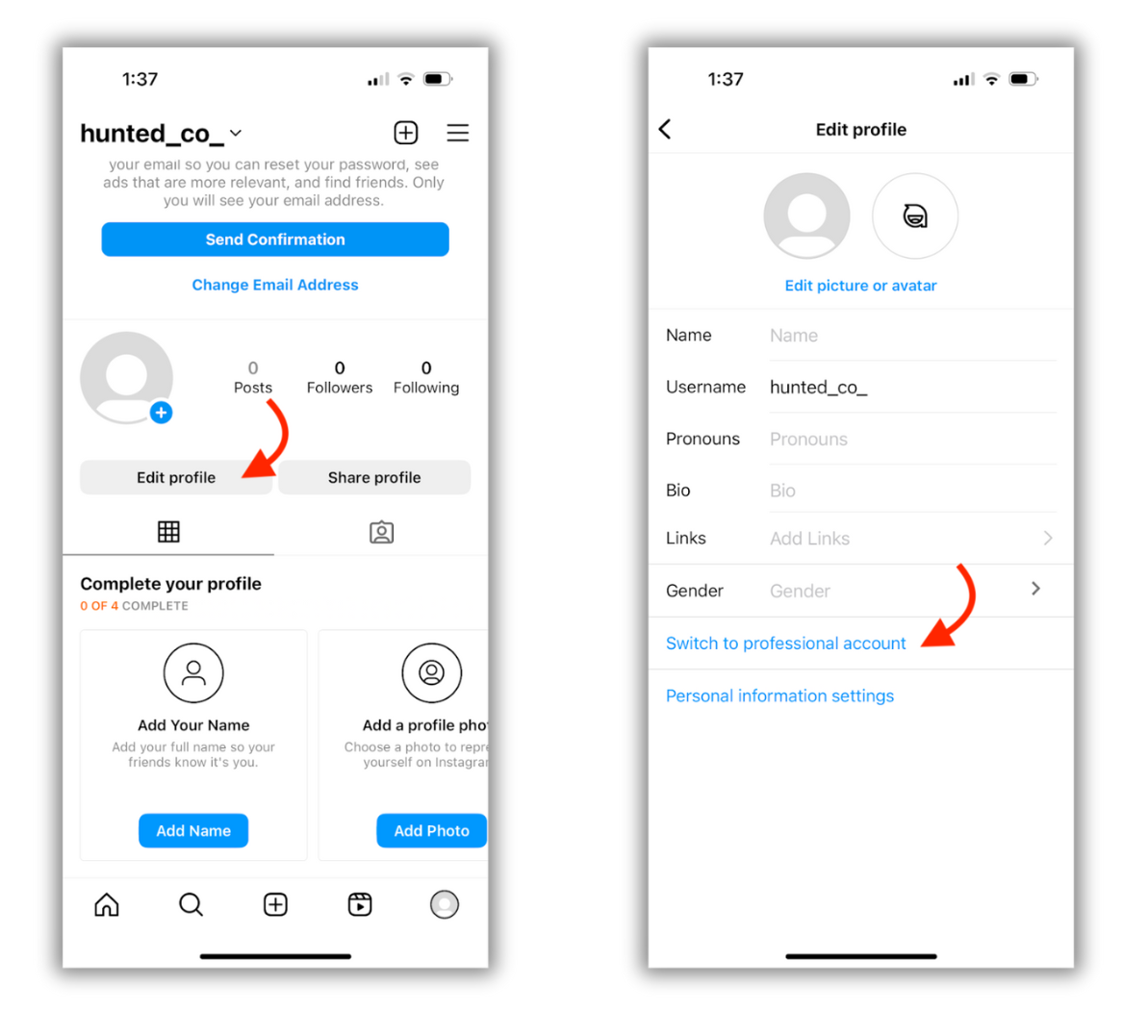
Tap Next
Select a category for your business and click Switch to Professional Account
Select a Business and tap Next
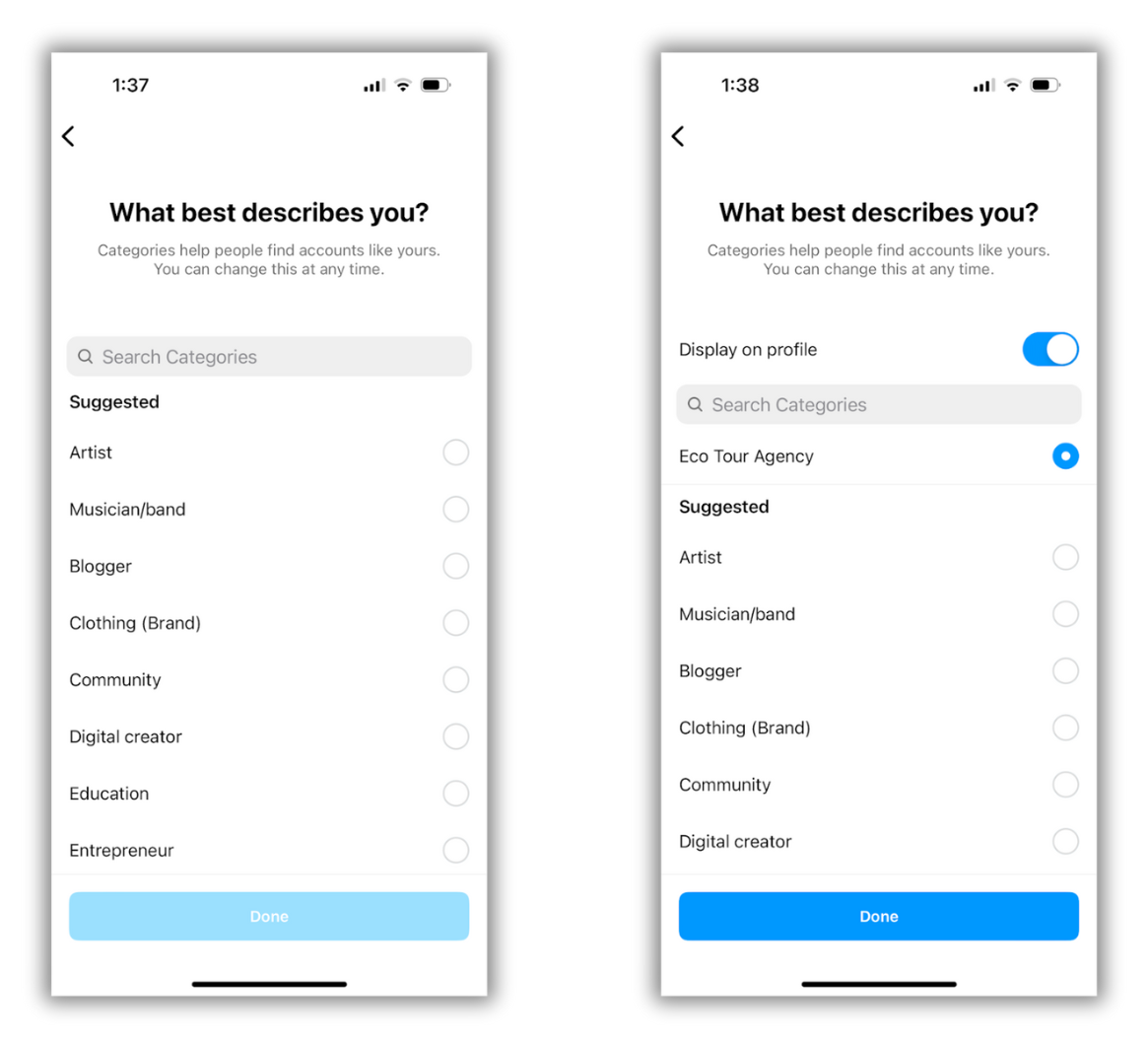
Add contact details and tap Next. You can skip this step.
Set up your professional account by completing the optional steps or tap X on the top right corner of the account to return to your profile.
To display or hide your business information, go to Profile, tap Edit Profile
How to Link Instagram Shop to a Facebook Page
One of Instagram's requirements on how to go to Instagram Shop is to link to a Facebook Page. This acts as your brand's representation on Facebook. Undoubtedly, this connection allows for integrating your product catalog. It also allows you to manage your sales channels across Instagram and Facebook. The process includes:
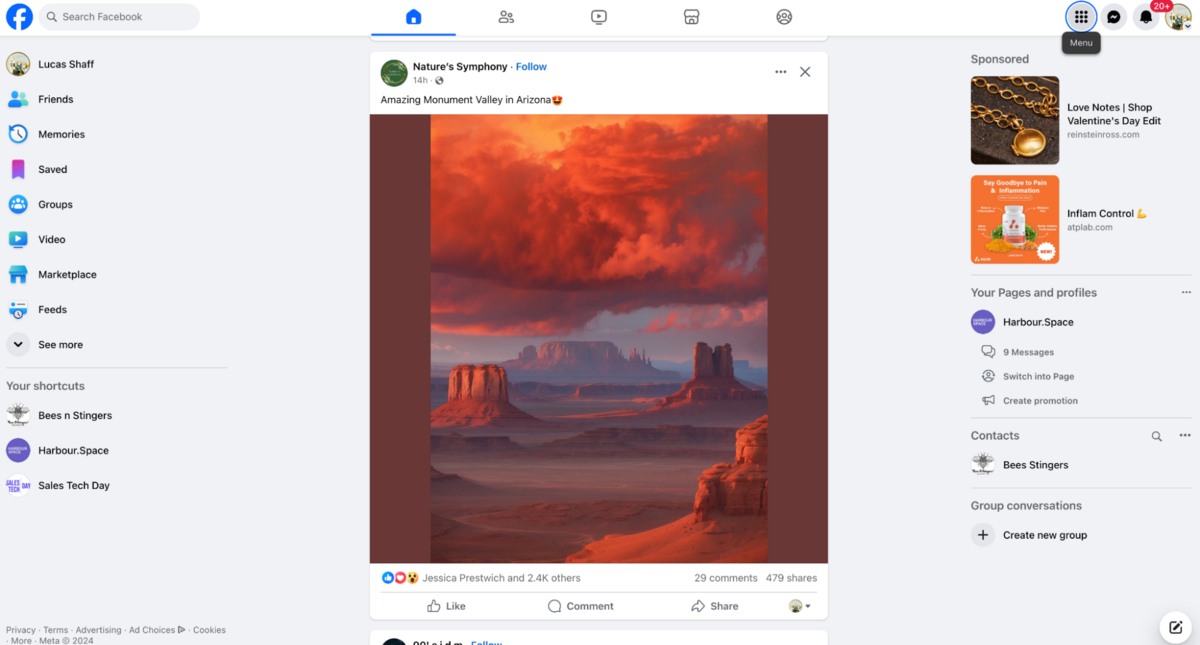
Login to Your Facebook Account: Open your Facebook account through the mobile app or web browser. Next, log into the account you want to create the Business Page with.
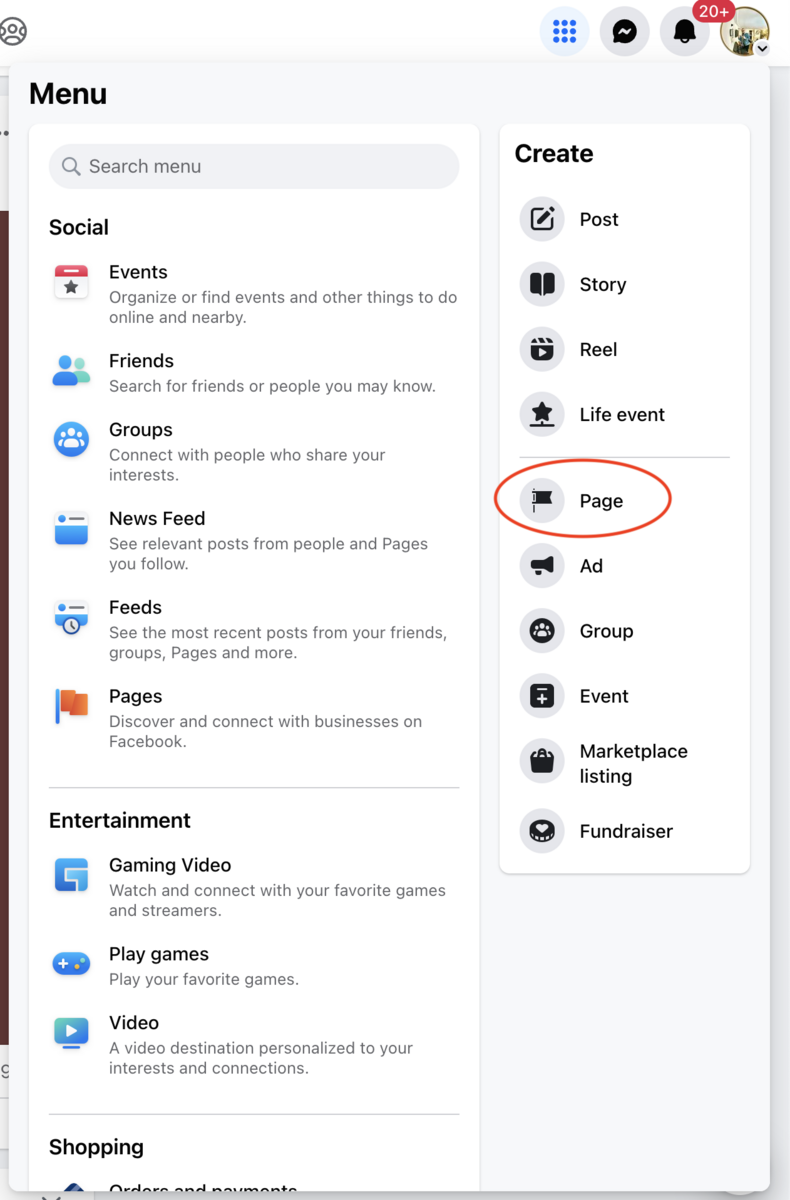
Go to Page Creation: A key procedure on how to find Instagram Shop is to navigate to the creation page by clicking on the menu and then select Page under the segment Create. If you are using Facebook's mobile application, select Pages first and select Create or +Create key.
Provide Page Information: You will then be prompted to provide your page's name and select a category that best describes your page.
Enter Your Business Information: Provide your business name, brief description, and category. Providing this information reflects your business.
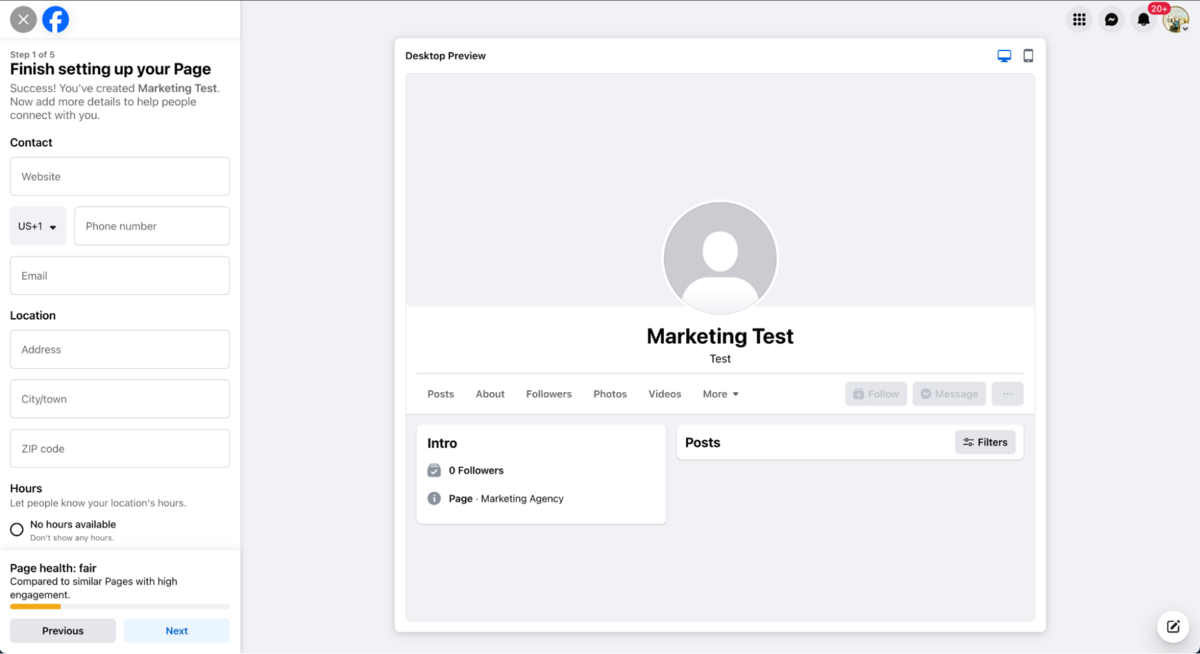
Upload Profile and Cover Photos: Upload your images for cover photos and your profile. Select images which represent your brand well like your logo for the profile picture and images of your products, shop, or a marketing banner for your cover.
Fill Out Additional Business Details: Navigate to your page's 'About' section to provide more details about your brand like website, phone number, and operation hours.
Publish Your First Post: Publish your first post welcoming visitors to your new page. This can be through a promotion, a simple introduction to the business, or the unveiling of a new product. This is a key step that you must keep in mind while understanding how to find Instagram Shop.
Go to Your Instagram Business Profile: Open your Instagram app and select to switch to your business profile
Access Edit Profile: On the business profile page, select "Edit Profile" above the grid showing the posts.
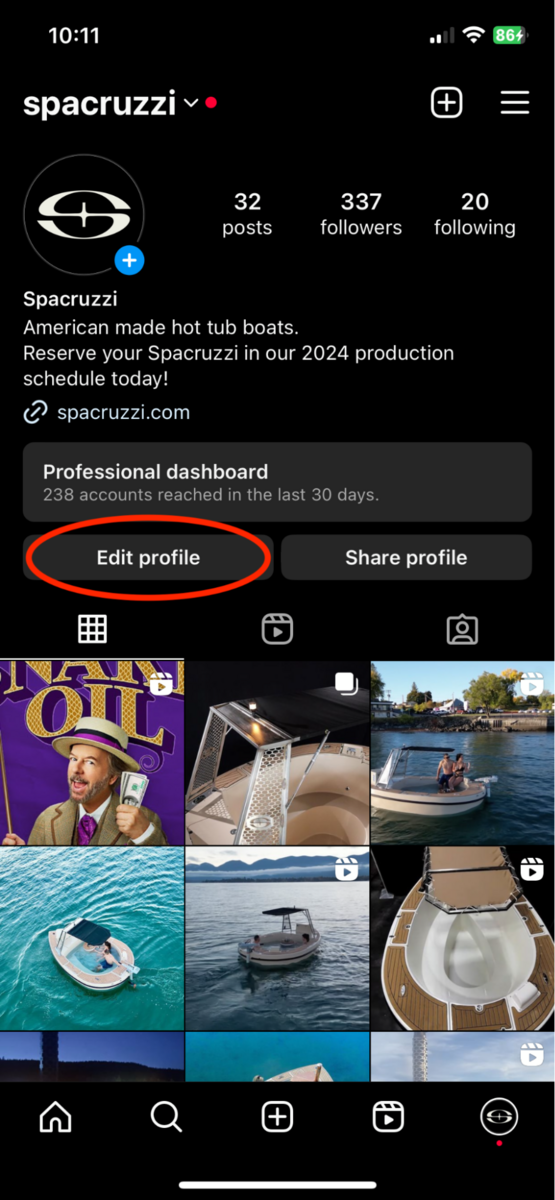
Find pages: This is found in the edit profile part. Find Page under the Public Business Information option.
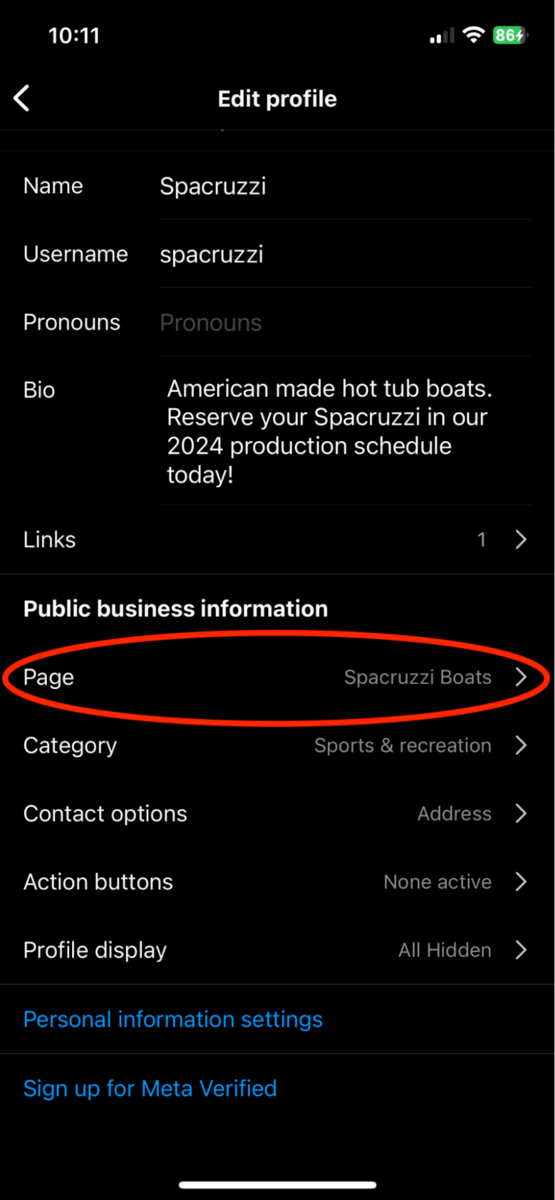
Link to Facebook: Click "Page" where you are prompted to connect to an existing Facebook page. Click Done after selecting a page.
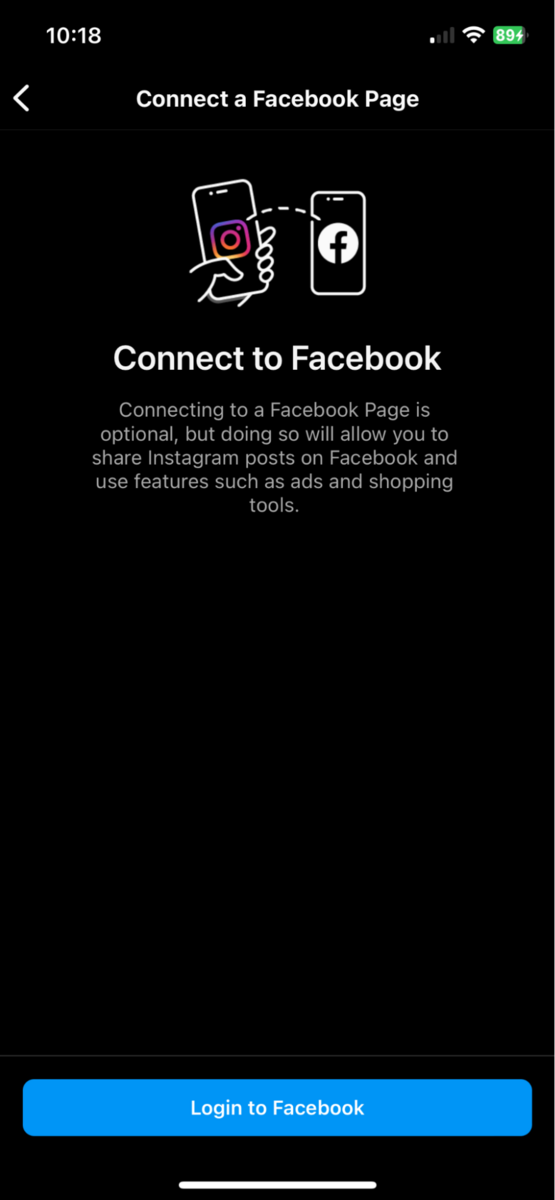
Check the Connection: Once you are done with linking to your Facebook account, go back to your Instagram account settings to verify that the Linked Accounts are correct. Linking your Facebook account is one of the prerequisites on how to get approved for Instagram Shopping.
After linking your Facebook account, a key step on how to go to Instagram Shopping, the next procedure is to integrate your product catalog with Instagram. This can be done through Facebook Business Manager where you can upload product images and details. The catalog should be up-to-date and comprehensive.
Setting Up a Product Catalog
To set up product catalog, follow the steps below:
Visit Facebook Business Manager: Visit your Facebook Business Manager account. If you have not created one, you can do it here.
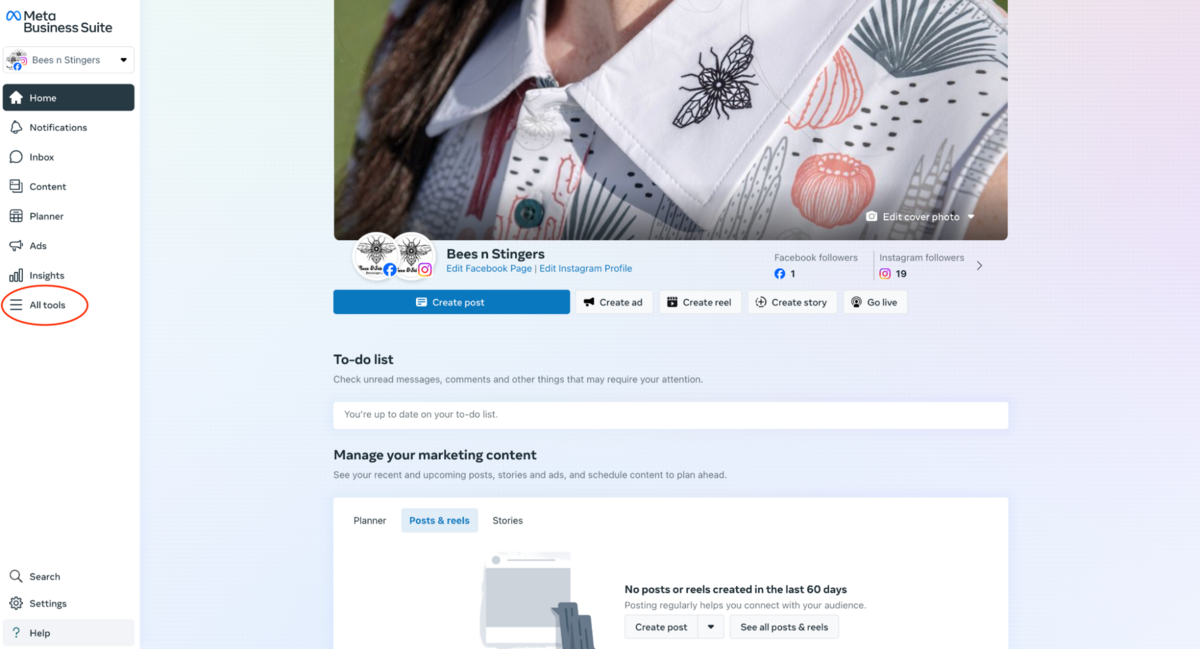
Access Catalog Manager: Under the Business Manager section, scroll down Commerce or search for Catalog Manager in the search bar.
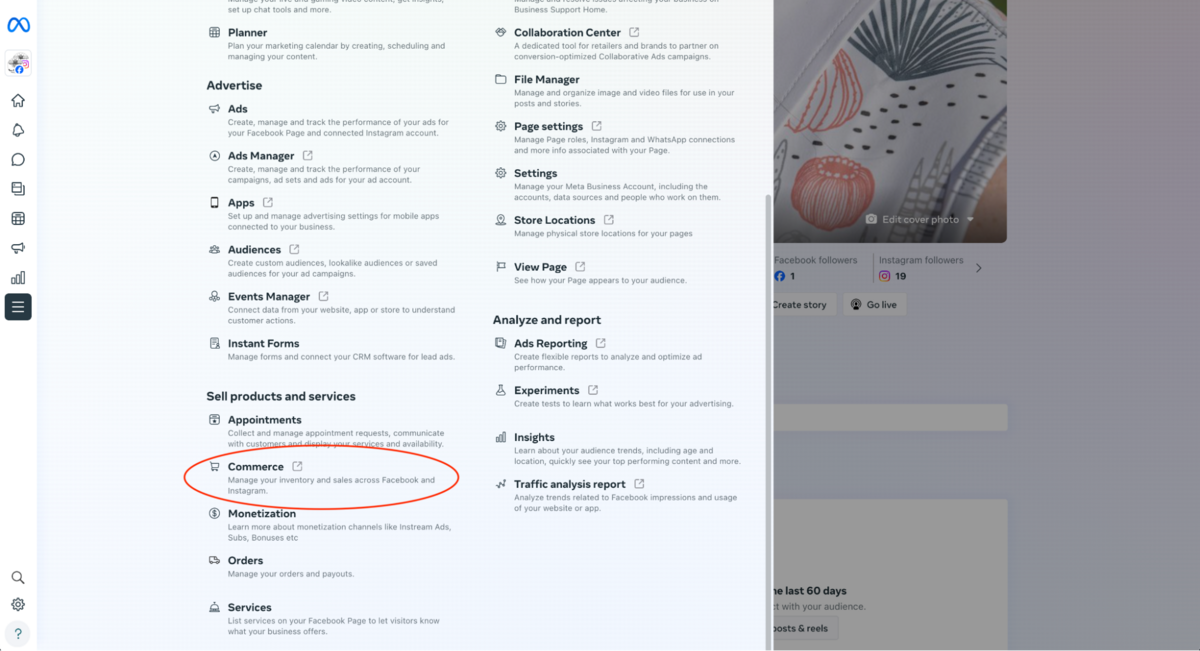
Create a Catalog: Click on Catalog if you have not created one. Next, choose Items to be added to the catalog.
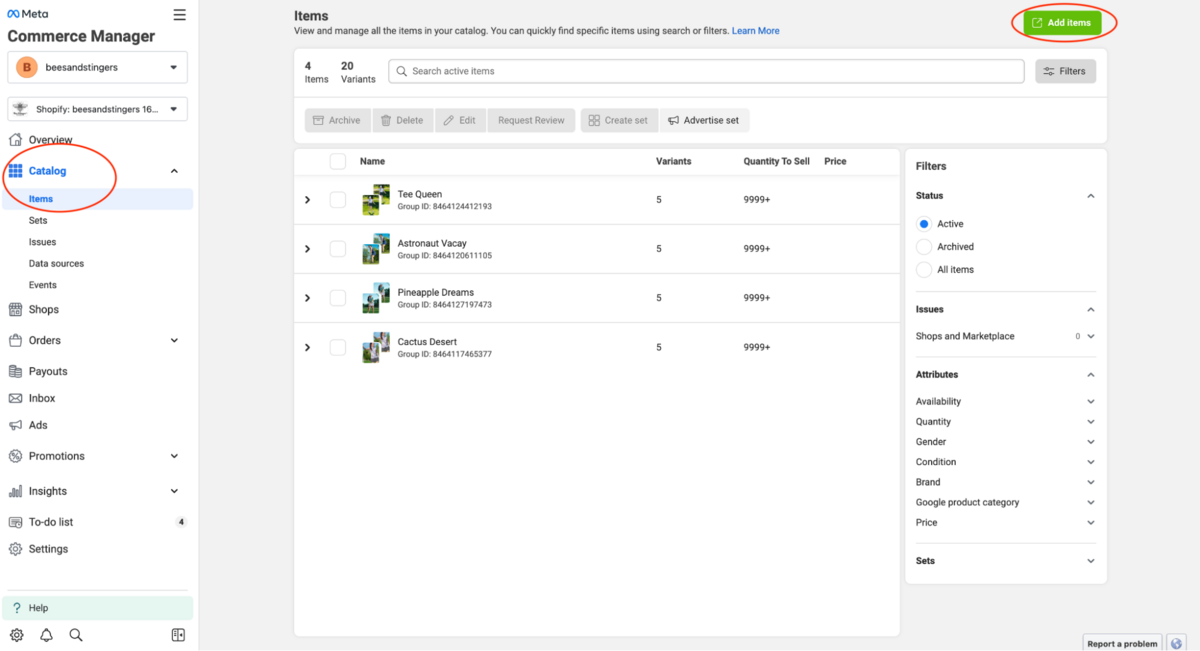
Add Your Products: After creating your catalog, add products manually using bulk upload options like spreadsheets or by integrating with ecommerce platforms like Shopify.
How to Build a High-Quality Catalog for Instagram Shopping
Now that we have explored how to get approved for Instagram Shopping, how can you build a high-quality catalog on your Instagram? Follow our pro tips below:
Optimize Your Product Catalog: This can be done by using high-quality images, accurate availability and pricing, detailed product descriptions, and checkout informat...
In the modern competitive digital landscape, Instagram Shopping is a key tool for brands seeking to expand their reach and optimize sales through the platform. Instagram Shopping allows brands to showcase their products and services directly on their Instagram stories and Instagram feed.
However, getting approved is a process that demands more than active Instagram account, which has been a hurdle for many brands. This guide explores the step-by-step process on how to get approved for Instagram Shopping and the best practices for optimal outcomes.
Instagram Shopping Eligibility Requirements
Before commencing the Instagram Shopping application process, you must first understand Instagram Shopping eligibility requirements. These requirements include:
a). Comply with Instagram policies
Your Instagram must comply with Instagram's Terms of Use and Community Standards otherwise your account may be disabled.
b). Represent Your Business and Your Domain
Your Instagram Shopping account contains product listings that can be directly purchased from your website. This means that you must provide your brand's domain. To confirm your domain, Instagram might require you to complete the domain verification process.
c). Be Located in a Supported Country
Your brand's Instagram Shopping account must be located in one of the countries supported by Instagram commerce features. Currently, checkout on Instagram is only supported in the United States.
d). Demonstrate Trustworthiness
Your Instagram account should have demonstrated trustworthiness, including an authentic, established presence on Instagram. This might also include maintaining a good follower base.
e). Provide Accurate Information and Follow Best Practices
Failure to comply with the requirements above at any time might lead to the loss of Instagram Shopping features or your account being disabled.
These policies are meant to create a trustworthy and safe environment for Instagram users. Now, let's discuss the step-by-step process of how to get approved for Instagram Shopping.
How to Get Approved for Instagram Shopping
Setting Up Your Instagram Business Account
The first step towards getting approved for Instagram Shopping is opening an Instagram Business Account. If you currently have a private or personal account, you must switch to a business profile on your account settings.
The procedure on how to set up a business account on Instagram includes:
Login to your Instagram Account: You can access the Instagram account via mobile or computer device.
Tap Profile or your profile picture in the bottom right to go to your Instagram profile
Tap Edit Profile
Tap Switch to Professional Account
Tap Next
Select a category for your business and click Switch to Professional Account
Select a Business and tap Next
Add contact details and tap Next. You can skip this step.
Set up your professional account by completing the optional steps or tap X on the top right corner of the account to return to your profile.
To display or hide your business information, go to Profile, tap Edit Profile
How to Link Instagram Shop to a Facebook Page
One of Instagram's requirements on how to go to Instagram Shop is to link to a Facebook Page. This acts as your brand's representation on Facebook. Undoubtedly, this connection allows for integrating your product catalog. It also allows you to manage your sales channels across Instagram and Facebook. The process includes:
Login to Your Facebook Account: Open your Facebook account through the mobile app or web browser. Next, log into the account you want to create the Business Page with.
Go to Page Creation: A key procedure on how to find Instagram Shop is to navigate to the creation page by clicking on the menu and then select Page under the segment Create. If you are using Facebook's mobile application, select Pages first and select Create or +Create key.
Provide Page Information: You will then be prompted to provide your page's name and select a category that best describes your page.
Enter Your Business Information: Provide your business name, brief description, and category. Providing this information reflects your business.
Upload Profile and Cover Photos: Upload your images for cover photos and your profile. Select images which represent your brand well like your logo for the profile picture and images of your products, shop, or a marketing banner for your cover.
Fill Out Additional Business Details: Navigate to your page's 'About' section to provide more details about your brand like website, phone number, and operation hours.
Publish Your First Post: Publish your first post welcoming visitors to your new page. This can be through a promotion, a simple introduction to the business, or the unveiling of a new product. This is a key step that you must keep in mind while understanding how to find Instagram Shop.
Go to Your Instagram Business Profile: Open your Instagram app and select to switch to your business profile
Access Edit Profile: On the business profile page, select "Edit Profile" above the grid showing the posts.
Find pages: This is found in the edit profile part. Find Page under the Public Business Information option.
Link to Facebook: Click "Page" where you are prompted to connect to an existing Facebook page. Click Done after selecting a page.
Check the Connection: Once you are done with linking to your Facebook account, go back to your Instagram account settings to verify that the Linked Accounts are correct. Linking your Facebook account is one of the prerequisites on how to get approved for Instagram Shopping.
After linking your Facebook account, a key step on how to go to Instagram Shopping, the next procedure is to integrate your product catalog with Instagram. This can be done through Facebook Business Manager where you can upload product images and details. The catalog should be up-to-date and comprehensive.
Setting Up a Product Catalog
To set up product catalog, follow the steps below:
Visit Facebook Business Manager: Visit your Facebook Business Manager account. If you have not created one, you can do it here.
Access Catalog Manager: Under the Business Manager section, scroll down Commerce or search for Catalog Manager in the search bar.
Create a Catalog: Click on Catalog if you have not created one. Next, choose Items to be added to the catalog.
Add Your Products: After creating your catalog, add products manually using bulk upload options like spreadsheets or by integrating with ecommerce platforms like Shopify.
How to Build a High-Quality Catalog for Instagram Shopping
Now that we have explored how to get approved for Instagram Shopping, how can you build a high-quality catalog on your Instagram? Follow our pro tips below:
Optimize Your Product Catalog: This can be done by using high-quality images, accurate availability and pricing, detailed product descriptions, and checkout informat...
About Dan Ragan
Founder of UGC Factory and expert in user-generated content marketing strategies. With over 10 years of experience in digital marketing, Dan helps brands leverage authentic content to drive engagement and conversions.